The reorder worklist
When you raise a draft purchase order from items that have fallen below their reorder point.
Turn worklist rows into a draft purchase order
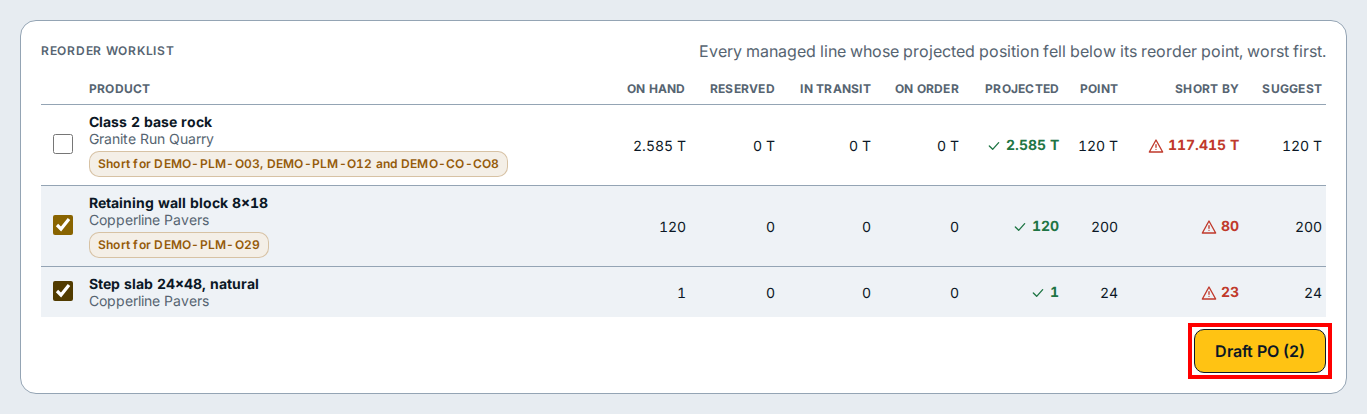
- On the Purchase orders page in Buying and Stock, click Open the worklist to open the Reorder worklist.
- Review the rows in the table to see each product, its supplier, any open customer orders it is short for, its on hand and projected stock, its reorder point, the short-by amount, and the suggested order quantity.
- Tick the checkbox on the left of each row you want to buy from the same supplier.
- Click Draft PO (2) (which shows the number of rows you ticked) at the bottom right to create a draft purchase order with those lines and their suggested quantities.
If you see this
- Every managed line whose projected position fell below its reorder point, worst first. The worklist orders the deepest shortages to the top so you can cover the most urgent stock gaps first.